



The American Medical Association reported that 22.5% of physicians spent more than eight hours a week on EHR tasks outside normal working hours in 2024. That number represents unpaid administrative time that could go toward patient care, staff retention, or leaving the office before dark.
The problem is rarely that a practice picked a bad EMR.
The problem is that most practices pick an EMR based on the charting demo, then discover weeks later how charges reach billing, what denial management looks like, and what the contract says about getting data out.
A charting screen that feels fast during a sales presentation tells you almost nothing about whether claims will submit cleanly, whether eligibility checks run before the patient sits down, or whether your staff will spend afternoons exporting charges into a separate billing system.
Here’s what this guide covers:
- Features, pricing, and specialty fit for 10 EMR systems used across U.S. ambulatory practices
- Verified public pricing where vendors publish it, and honest labels where they don’t
- Independent user-review evidence from Capterra, with ratings and review counts
- Where each system fits and where it falls short
The comparison below is organized around common practice needs, not a scored ranking.
Quick skim: 10 EMR systems compared
This table shows each system’s primary fit, pricing structure, and the documented capability that separates it from the rest.
| EMR Software | Best Fit | Pricing Model | Distinguishing Capability |
| eClinicalWorks | Multi-provider ambulatory groups, FQHCs | 499-599/provider/month | Broad EHR, PM, RCM, and Sunoh.ai ambient documentation |
| athenaOne | Practices seeking integrated clinical and billing workflows | Negotiated % of collections | Network-supported billing rules and automated claim management |
| Practice Fusion | Small independent medical practices | From $199/provider/month (annual) | Lower published subscription with integrated billing options |
| ModMed (EMA / gGastro) | Dermatology, ophthalmology, orthopedics, and other supported specialties | Custom quote | Specialty-specific clinical workflows across 11 medical fields |
| Nextech | Plastics, aesthetics, med spas, ophthalmology, dermatology | Custom quote | Photography, memberships, and aesthetic payment workflows |
| Elation Health | Independent primary care, DPC, longitudinal care | Custom quote | Primary care clinical records with expanding integrated billing |
| DrChrono | Mobile-first practices needing configurable workflows | Foundation / Growth / Premium tiers, quoted | Native iPad/iPhone charting with open API |
| Praxis EMR | Physicians who prefer template-free documentation | Vendor quote | Concept Processing that learns from each physician’s notes |
| CharmHealth | Budget-conscious and integrative medicine practices | Free / $0.50 per encounter / $200/provider/month | Published low-cost plans with PM, billing, and supplement integrations |
| Office Practicum | Pediatric practices | Custom quote | VacLogic vaccine inventory, VFC management, and immunization forecasting |
1. eClinicalWorks
eClinicalWorks is a cloud-based ambulatory EHR platform serving independent offices, multispecialty groups, and community health centers.
Its product line covers electronic health records, practice management, patient engagement through healow, revenue cycle management, and the Sunoh.ai ambient documentation tool developed by healow and integrated into the eClinicalWorks environment.
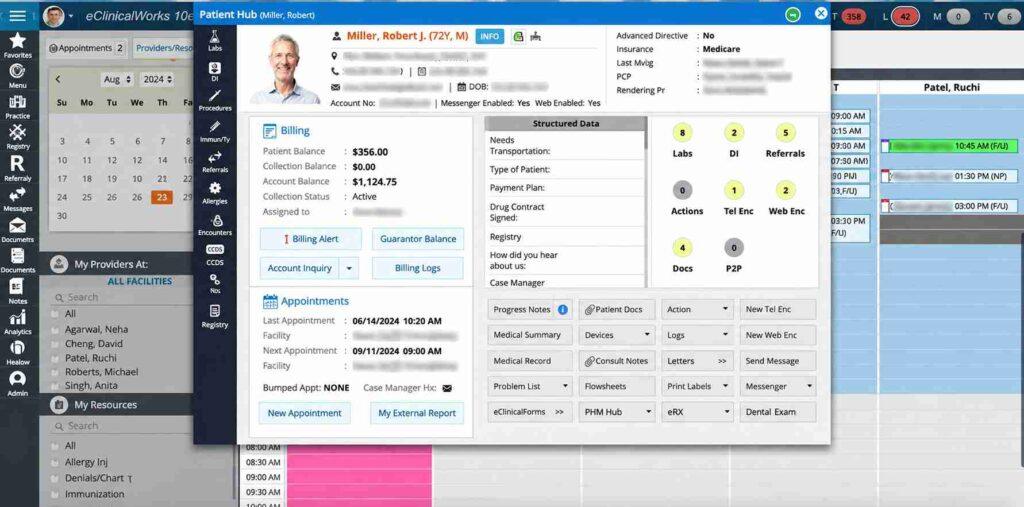
The pitch is breadth — one vendor supplies charting, scheduling, PM, patient communication, and an AI scribe.
However, the tradeoff is density. The interface carries a lot of information, and training runs longer than it does with leaner cloud EMRs. Multi-provider primary care groups and FQHCs that want a single vendor relationship tend to get the most from it.
The part buyers often underestimate is how long clinical staff needs to feel comfortable with the system. A practice moving from paper or a simpler EMR should plan training weeks into the implementation timeline, not discover them.
Key features
The feature set targets practices that see high patient volumes and need charting, billing, and patient engagement in one place.
- healow app for scheduling, messaging, and telehealth
- Integrated PM, EPCS e-prescribing, and claims workflow
- Specialty templates and order sets for primary and specialty care
- RCM-as-a-Service offering with denial and rejection management
- Sunoh.ai ambient documentation that drafts notes from visit conversations
Pricing
eClinicalWorks publishes its core subscription rates, which is more transparency than most specialty EMRs offer.
| Plan | Published Price |
| EHR-only | $499/provider/month |
| EHR + Practice Management | $599/provider/month |
| RCM-as-a-Service | 2.9% of collections |
The published plans state no startup costs for practices with nine or fewer providers, though larger implementations carry additional fees.
Patient communications, statements, and travel expenses may also generate separate charges. Confirm the full cost before signing, because the monthly rate rarely captures the total.
Pros and cons
The value proposition and the friction tend to come from the same source: scope.
| Pros | Cons |
| One vendor for EHR, PM, portal, RCM, and ambient AI documentation | Dense interface with a documented learning curve |
| Scales from single-provider offices to FQHC networks | Customer support consistency is a recurring concern in reviews |
| Published subscription pricing | 2017 federal settlement raises historical questions (see below) |
In May 2017, eClinicalWorks agreed to pay $155 million to resolve federal False Claims Act allegations involving EHR software certification and related conduct.
The DOJ stated that the settlement resolved allegations and did not constitute a determination of liability. The software has continued operating and updating since then, but buyers should know the history.
User reviews about eClinicalWorks
As of October 2026, eClinicalWorks holds a 3.3/5 overall rating from 396 reviews on Capterra, with a 2.8/5 customer service score.
Reviewers discuss extensive functionality and configuration options. The documented criticism centers on complexity and customer support, particularly after onboarding.
The 2.8 support score gives that concern measurable context. Practices with dedicated IT staff tend to handle the system’s depth more comfortably than solo physicians managing their own setup.
2. athenaOne
athenaOne is athenahealth’s cloud-based platform combining electronic health records, medical billing, practice management, and patient engagement.
Its billing tools draw on shared network data, payer rules, and claims automation to support billing operations across its customer base.
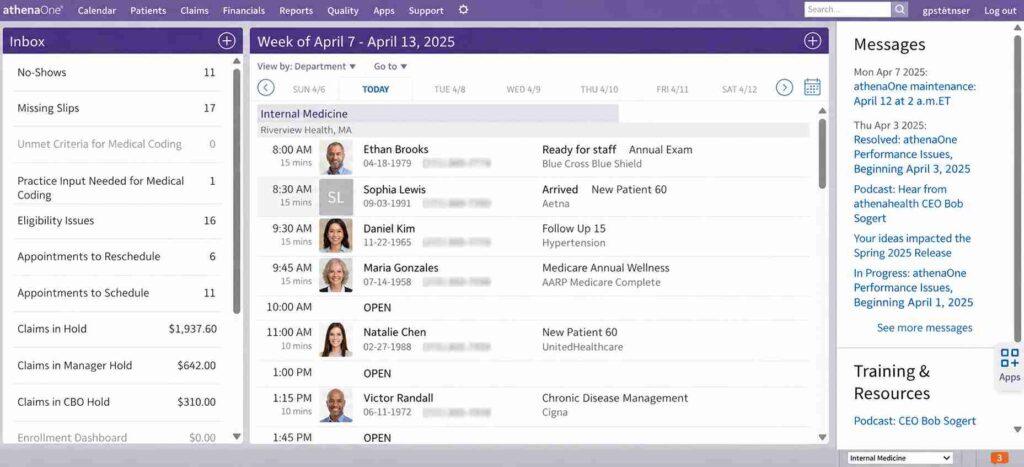
The core idea is that when a payer changes a rule, athenahealth’s network can push updates to customer workflows, potentially catching the change before your claim triggers a denial. In practice, the speed and completeness of those updates can vary.
The billing model uses a percentage of collections rather than a flat subscription, which means costs scale with revenue. That structure rewards practices whose collections grow, but it also means the fee grows with them.
athenaOne fits practices that want integrated EHR and billing workflows in the cloud and can accept limited interface customization.
Key features
athenaOne’s value sits where the clinical record meets the claim.
- Marketplace of third-party integrations
- Network-supported claim rules and payer-rule updates
- Built-in billing, patient communication, and reporting tools
- Managed RCM workflows and denial correction capabilities
- athenaClinicals charting with ambient documentation options
Pricing
athenahealth prices through individual quotes, typically as a negotiated percentage of practice collections plus implementation. No public rate card exists.
The company advertises minimal upfront costs and flexible agreements, though buyers should confirm the specific services, implementation provisions, and contractual terms included in their quote.
Do not assume a standard percentage — the number varies by practice size, specialty, and scope of service.
Pros and cons
The model works well for practices that want billing infrastructure built in and don’t need to rearrange the interface.
| Pros | Cons |
| Network-supported payer-rule updates across billing workflows | Percentage-of-collections pricing increases as revenue grows |
| No local servers or manual system upgrades | Limited interface customization |
| Integrated RCM capabilities with denial management | Individual quotes make cost comparison harder before signing |
User reviews about athenaOne
As of October 2026, athenaOne holds a 3.8/5 overall rating from 915 reviews on Capterra, with a 3.6/5 customer service score.
Practice managers frequently credit the billing side and reporting tools. Some clinicians report frustration with click counts and interface rigidity. Support experiences appear mixed, with both favorable and critical reports present in the review base.
Avoid calling this a universally loved or disliked system — it depends heavily on how well the practice aligns with athenaOne’s workflow assumptions.
3. Practice Fusion
Practice Fusion is a cloud-based EHR owned by Veradigm (formerly Allscripts), designed for small independent medical practices. It includes charting, e-prescribing, clinical connections, and patient access tools.
Also, Practice Fusion now offers integrated billing software and managed billing services.
Practices can use the vendor’s own billing product or connect to a third-party service, but the claim that billing is absent from the platform no longer holds.
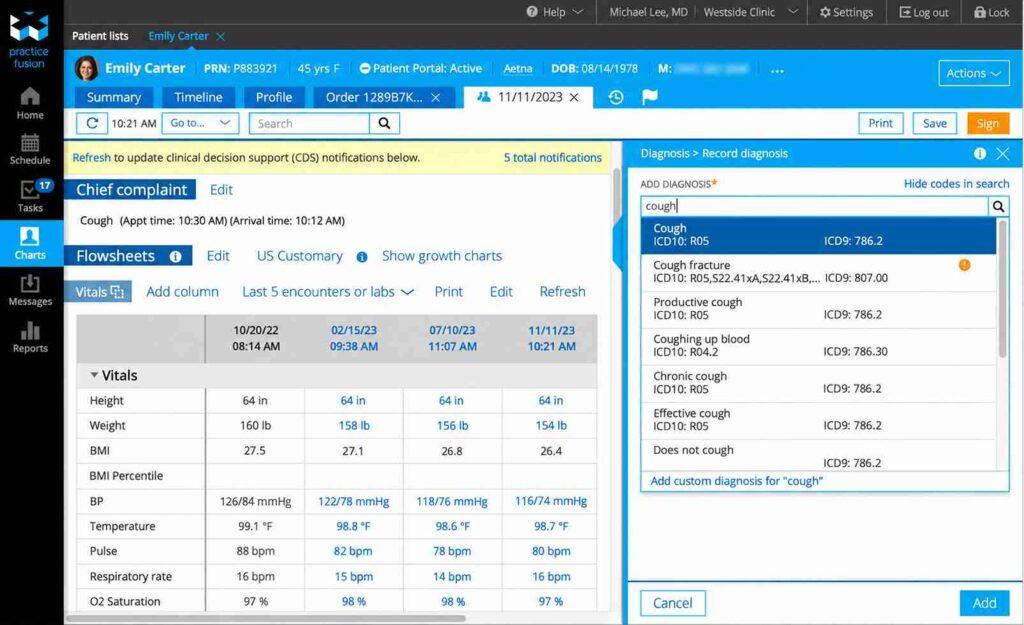
Practice Fusion’s appeal for small practices remains the lower published subscription price and a reported go-live period that can fall under two weeks for simple implementations.
The risk sits with the parent company. Veradigm’s common stock was suspended from Nasdaq in February 2024 following compliance issues with exchange reporting and governance requirements.
Buyers should ask about product support commitments, development timelines, and data portability before committing.
Key features
The feature set is intentionally focused — a smaller practice that needs charting and billing without managing a complex system.
- Patient portal access
- SOAP charting templates
- Lab and imaging integrations
- E-prescribing, including controlled substances (EPCS)
- Integrated billing software and available billing services
Pricing
Practice Fusion publishes its subscription rate, which is unusual for an EMR.
| Plan | Published Price |
| EHR subscription | From $199/provider/month, billed monthly with annual commitment |
| Signing staff licenses | Three included |
| Non-signing staff licenses | Unlimited |
Billing services and other add-on arrangements are quoted separately.
Pros and cons
Simplicity is both the selling point and the ceiling.
| Pros | Cons |
| Published flat pricing from $199/provider/month | Parent company (Veradigm) delisted from Nasdaq in 2024 |
| Fast setup for small practices | Feature set is limited compared to specialty or multi-provider EMRs |
| Integrated billing software now available | Roadmap uncertainty tied to corporate governance questions |
User reviews about Practice Fusion
As of October 2026, Practice Fusion holds a 3.7/5 overall rating from 441 reviews on Capterra, with a 3.3/5 customer service score and a 3.9/5 ease-of-use score.
The positive theme is simplicity and speed of learning. The negative patterns center on customer support responsiveness and technical problems.
For small practices weighing ease of adoption against long-term vendor stability, both sides of that equation matter.
4. ModMed (EMA and gGastro)
ModMed develops specialty-specific EHR, practice management, patient engagement, and revenue cycle software. Its EMA electronic health record supports specialties including dermatology, ophthalmology, orthopedics, plastic surgery, and otolaryngology.
Gastroenterology practices use ModMed’s separate gGastro EHR — EMA and gGastro are different products, and referencing EMA for gastroenterology is inaccurate.
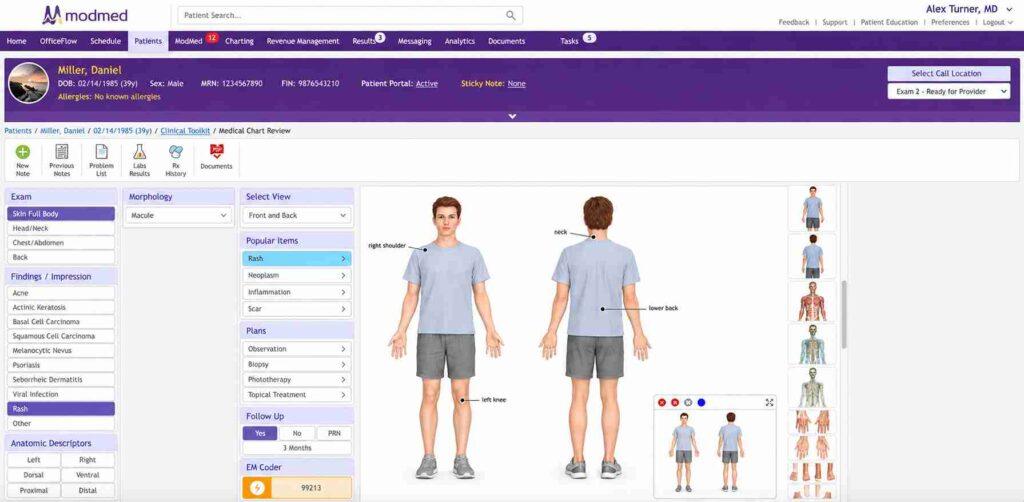
ModMed’s broader portfolio covers 11 medical specialties, with documentation, clinical terminology, and workflows built for each field.
The value case is speed. High-volume specialty clinics that see 30 or 40 patients a day need charting that speaks their clinical language, not a general-purpose system wrapped in a specialty skin.
The cost reflects that. A primary care group has no reason to pay for dermatology-specific logic.
Key features
Everything here speaks the specialty’s clinical vocabulary.
- Integrated PM, patient portal, and analytics
- Optional ModMed RCM services with denial management
- Specialty-specific exam templates, diagrams, and photo capture
- Coverage across 11 specialties through EMA, gGastro, and related products
- Documentation that adjusts to each physician’s charting preferences over time
Pricing
ModMed provides custom quotes. Subscription charges and implementation costs depend on the products, specialties, provider count, and services selected. No published rate card exists.
Pros and cons
Specialists get speed and clinical fit. Generalists get a bill for capabilities they won’t touch.
| Pros | Cons |
| Documentation built around specialty-specific exams and workflows | Higher cost than general-purpose EMRs |
| Strong mobile charting on iPad | Limited value outside supported specialties |
| RCM services available | Gastroenterology uses gGastro, not EMA — verify the correct product |
User reviews about ModMed
As of October 2026, ModMed holds a 4.5/5 overall rating from 568 reviews on Capterra, with a 4.3/5 customer service score.
Reviewers frequently cite charting speed on the iPad and specialty-specific workflows.
Individual users raise pricing and integration concerns, but the 4.3 customer service score does not support describing support problems as a widespread pattern.
The system earns its highest marks from practices where the specialty match is tight.
5. Nextech
Nextech provides specialty EHR and practice management technology for ophthalmology, plastic surgery, dermatology, orthopedics, and medical spas.
Its aesthetic-care products connect clinical documentation with patient photography, inventory tracking, membership management, and payment processing.
For practices that sell treatment packages, track before-and-after photos, and manage retail inventory alongside clinical visits, Nextech combines functions that would otherwise require separate systems.
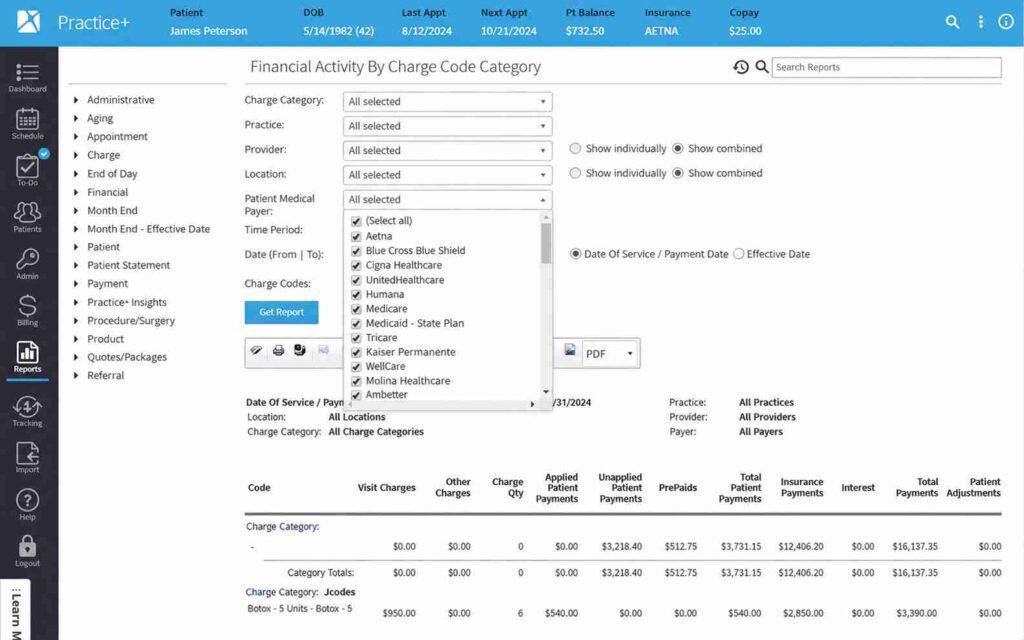
The scope is also the boundary — practices outside aesthetics and eye care will pay for tools they never open.
One detail to examine during the sales process: some photography tools in the Nextech environment have historically involved partnerships (such as RxPhoto).
Confirm whether the photo management you need is included natively or requires a separate agreement. Also review the payment-processing terms — publicly available contract language references a potential monthly non-usage fee under certain conditions.
Key features
The toolkit treats the clinical chart and the Botox package as equal priorities.
- Inventory, retail, and package tracking
- Payment processing and aesthetic business workflows
- Before-and-after photo management and clinical imaging
- Integrated PM, patient engagement, and membership tools
- Specialty charting for ophthalmology, plastics, dermatology, and orthopedics
Pricing
Nextech prices through custom quotes based on specialty, practice size, and selected modules.
Pros and cons
The specialty fit is strong inside its lane and poor outside it.
| Pros | Cons |
| Aesthetic business tools built directly into the EMR | Narrow specialty scope |
| Strong photo and inventory workflows | Onboarding effort reported by some users |
| Combined clinical and retail management | Review payment-processing terms and contract fees before signing |
User reviews about Nextech
As of October 2026, Nextech holds a 4.1/5 overall rating from 239 reviews on Capterra, with a 4.0/5 customer service score.
Reviews show generally favorable usability and specialty functionality. Some users report communication gaps and support-response delays.
Practices considering Nextech should test the complete workflow — charting, photo, billing, and package management — rather than evaluating charting alone.
6. Elation Health
Elation Health develops EHR and billing technology primarily for primary care practices, including independent and direct primary care (DPC) models. Its clinical platform places the patient’s longitudinal record beside the open note, so physicians can review the full clinical profile without switching tabs during a visit.
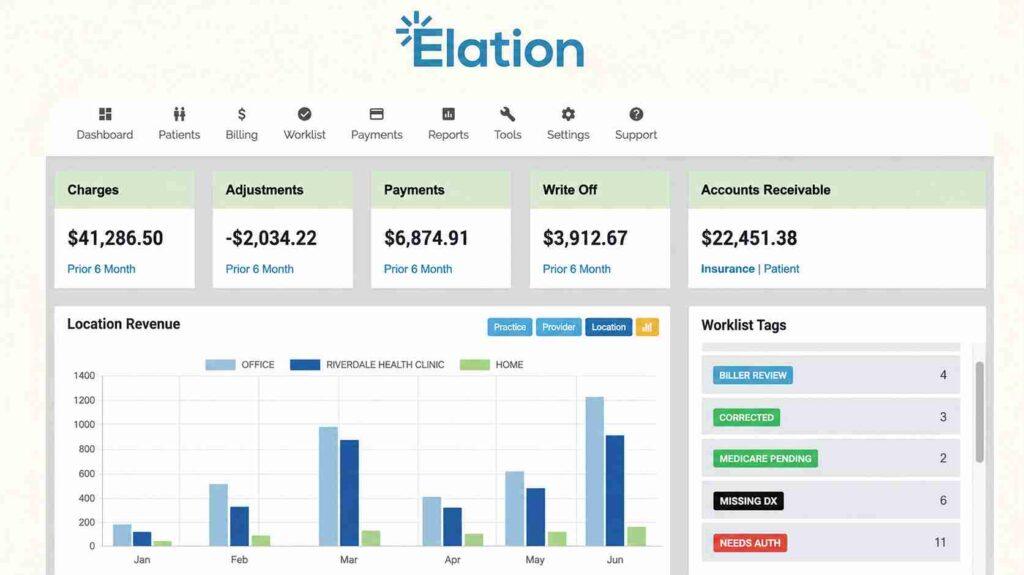
An important correction to older descriptions: Elation now offers a native billing software product. Its current capabilities include AI-assisted code suggestions, practice-specific fee schedules, insurance eligibility checks, pre-submission claims review, and claims processing.
If automated coding is a major buying criterion, compare these functions with dedicated medical coding software.
Automated payment posting was announced on October 15, 2026, with beta availability for new customers scheduled for November 1, 2026.
The distinction between billing software and outsourced revenue cycle management is important here. Elation’s service agreement specifies that the company does not provide RCM services under its billing software agreement.
Practices that need a fully outsourced revenue cycle department still need a separate billing service.
Key features
Elation is designed around the primary care visit and an expanding billing platform.
- Integrated billing software with AI-assisted coding workflows
- Eligibility verification and pre-submission claims review
- Side-by-side clinical profile and note view
- Patient messaging and scheduling
- Value-based care reporting
Pricing
Elation provides personalized quotes based on practice requirements. No public rate card exists.
Pros and cons
Primary care physicians get a clean chart and growing billing capabilities. Specialty practices and large groups are outside its primary focus.
| Pros | Cons |
| Clinical interface designed around longitudinal primary care | Primarily focused on primary care — limited specialty coverage |
| Expanding integrated billing with AI-assisted coding | Automated payment posting still in beta (as of October 2026) |
| Fits DPC and value-based care models | Outsourced RCM requires a separate service |
User reviews about Elation Health
As of October 2026, Elation Health holds a 3.8/5 overall rating from 83 reviews on Capterra, with a 3.3/5 customer service score.
Users frequently praise the chart layout and scheduling. Some report support delays and concerns about data extraction. The smaller review sample (83 reviews) means the rating carries less statistical weight than vendors with several hundred reviews.
Practices evaluating Elation should ask specifically about billing capabilities, since the product has changed faster than many online descriptions reflect.
7. DrChrono
DrChrono, part of EverHealth, provides cloud-based EHR, practice management, billing, patient engagement, and telehealth software.
It is designed for iPad and iPhone, with customizable medical forms, an open API, and tiered subscription plans.
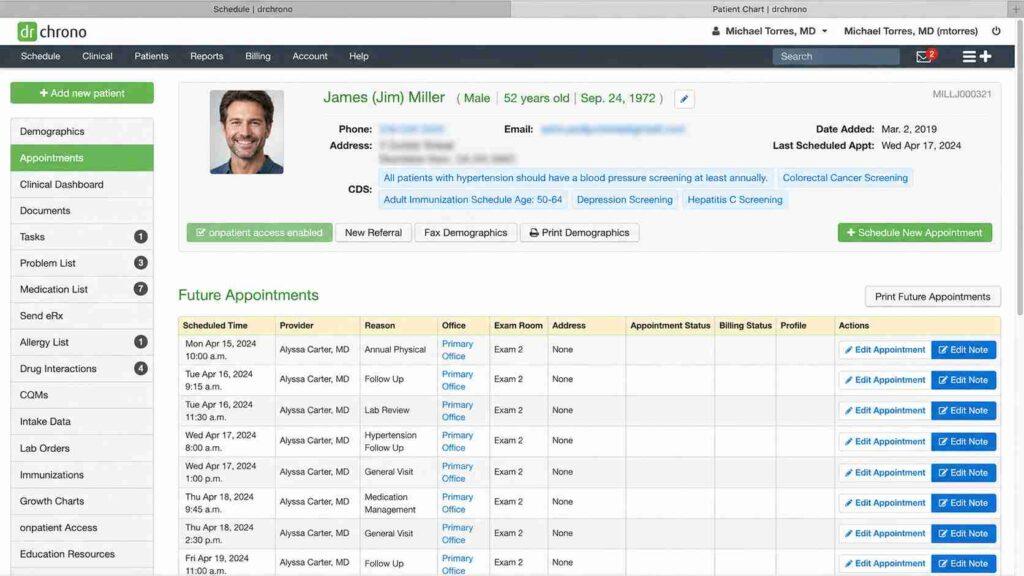
The mobility is the draw. Clinicians who chart on the move — between exam rooms, surgical centers, or multiple locations — get a system built for that workflow.
The recurring concern in reviews is billing reliability and support response time. That tension means the demo should include a full claim lifecycle test, not just a charting walkthrough.
Key features
DrChrono is built for practices that want mobile-first documentation and room to customize.
- Integrated billing and telehealth
- Custom medical forms and clinical templates
- Three subscription tiers with different billing and feature access
- Native iPad and iPhone charting
- Open API and app marketplace
Pricing
DrChrono lists three quote-based plans = Foundation, Growth, and Premium.
All include EHR and practice management, but billing functions, prescribing tools, advanced integrations, AI features, and communication allowances vary by plan.
The Foundation plan lists eligibility checks and claim-management functionality on a per-use basis.
Higher plans include broader billing access. Some laboratory integrations and AI documentation features are add-ons.
“Integrated billing” is accurate as a feature description, but the depth of billing functionality depends on which plan you purchase.
Pros and cons
Flexibility and billing reliability pull in opposite directions for some users.
| Pros | Cons |
| Strong mobile charting experience on iPad and iPhone | Billing-module complaints recur in user reviews |
| Highly customizable forms and templates | Support response times draw criticism |
| Open API for integrations | Billing capabilities differ substantially between plans |
User reviews about DrChrono
As of October 2026, DrChrono holds a 3.9/5 overall rating from 493 reviews on Capterra, with a 3.6/5 customer service score.
Reviews include positive comments about mobile charting and customization alongside negative reports about billing errors, technical reliability, and support response times.
The review base is large enough to identify those as recurring themes. Practices evaluating DrChrono should test the claims workflow on their actual plan tier, not on the demo environment.
8. Praxis EMR
Praxis EMR skips templates entirely. Its Concept Processing engine learns from each physician’s past documentation and suggests text from their own prior cases, so notes read like the physician actually wrote them rather than filled in a form.
The tradeoff is time. The engine needs several weeks of use before it starts producing useful suggestions, so the first phase feels slower than a template-based system.
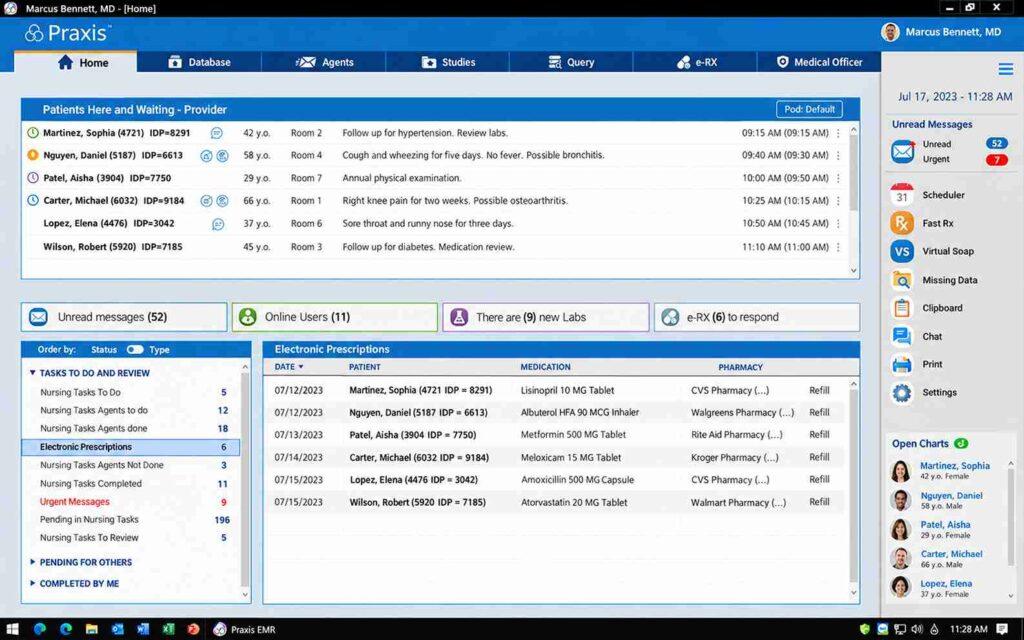
Praxis focuses on clinical documentation and integrates with third-party practice management and medical billing systems.
Practices can keep their existing billing arrangement or choose one of Praxis’s supported integration partners.
For physicians who dislike template-driven charting and want documentation that mirrors their clinical reasoning, Praxis is one of the few systems that deliberately takes that approach.
Key features
Praxis is built around one idea — templates flatten clinical reasoning, and documentation should reflect the physician’s own thinking.
- Works across multiple specialties
- Integrations with external PM and medical billing systems
- Template-free Concept Processing documentation engine
- Learns from each physician’s prior notes over time
- E-prescribing and lab interfaces
Pricing
Praxis pricing is quote-based. Confirm the cost of the EMR license, implementation, training, interfaces with your PM or billing system, and any third-party software requirements.
Praxis’s certified Version 9 product and its 2026 certification arrangement (involving EMR Direct) illustrate why buyers should verify the specific product version’s certification, not just the vendor brand.
Pros and cons
The payoff arrives after the learning period, and it requires committing to the approach.
| Pros | Cons |
| Notes that reflect each physician’s clinical reasoning | Slower initial weeks while the engine learns documentation patterns |
| Strong documented physician loyalty (5.0/5 Capterra rating) | No native PM or billing — requires external integration |
| Works across specialties | Requires commitment to template-free documentation philosophy |
User reviews about Praxis EMR
As of October 2026, Praxis EMR holds a 5.0/5 overall rating from 217 reviews on Capterra, with a 4.9/5 customer service score.
That rating is exceptional.
Reviewers emphasize personalized documentation, provider control, and clinical accuracy. Physicians who stay with Praxis tend to become unusually loyal because the system adapts to them rather than the reverse.
The review evidence does not strongly support claims about a “dated interface” — that complaint should be attributed to specific sources if used.
9. CharmHealth
CharmHealth provides cloud-based EHR, practice management, medical billing, telehealth, patient communication, and inventory capabilities.
It supports integrative and functional medicine workflows through integrations such as Fullscript for supplement dispensing.
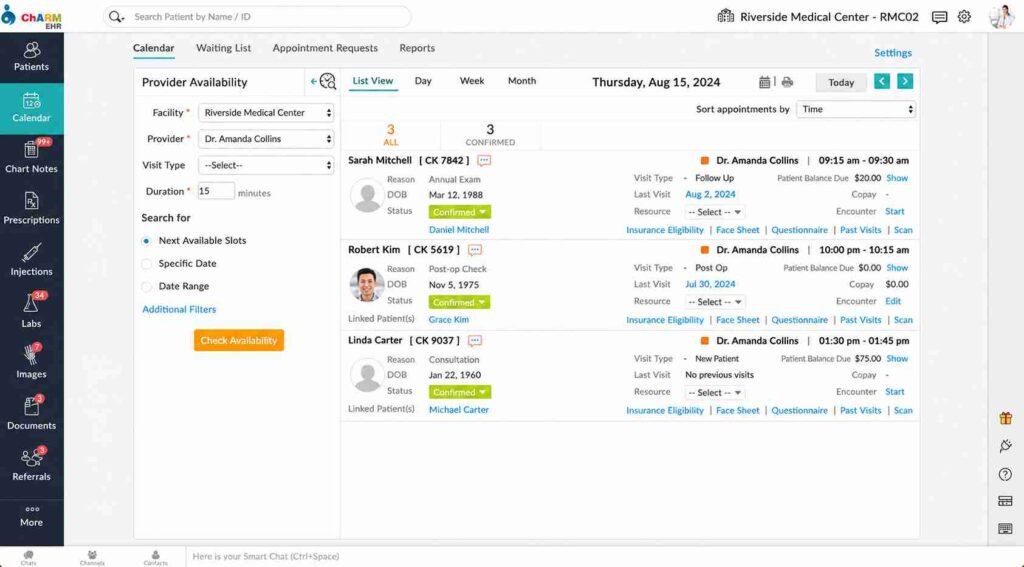
The appeal is the price-to-feature ratio, particularly for smaller and budget-conscious practices. CharmHealth is one of the few EMRs that publishes tiered pricing, including a free plan.
The catch is understanding the limits and add-on costs of each tier.
Key features
CharmHealth packs a substantial feature set into its published price tiers.
- Built-in telehealth and patient portal
- Integrated billing and claims submission
- Charting with integrative medicine templates
- Free live chat support available (not exclusively ticket-based)
- Supplement and dispensary support through Fullscript integration
Pricing
CharmHealth publishes multiple pricing tiers, which is valuable for budgeting but requires attention to what each tier includes.
| Plan | Price | Limits |
| Free | $0 | 50 encounters/month, 1 provider, 5 users, 1,000 patient records |
| Encounter-based | $0.50/encounter ($25/month minimum) | Scales with volume |
| Provider-based | $200/provider/month | Full access |
E-prescribing, EPCS, telehealth, electronic claims processing, and certain integrations may carry separate charges depending on the plan.
The free tier is a real option for very small practices, but its encounter and patient-record limits mean most practices will outgrow it.
A common buying mistake is comparing the headline monthly rate without checking which features generate additional charges.
A practice that budgets $200/month but uses e-prescribing, telehealth, and electronic claims may see a total cost that exceeds the plan rate.
Pros and cons
The value is clear, and so are the conditions attached to it.
| Pros | Cons |
| Published tiered pricing including a free plan | Free plan has tight encounter, provider, and record limits |
| Strong fit for integrative and functional medicine | Some features carry separate charges depending on tier |
| Free live chat support available | Individual reviews report technical issues after updates |
User reviews about CharmHealth
As of October 2026, CharmHealth holds a 4.2/5 overall rating from 153 reviews on Capterra, with a 3.7/5 customer service score.
Reviews support both its appeal as a combined EHR and scheduling system and reports of technical problems.
Some users describe support dissatisfaction, though the vendor does offer live chat, not just ticketing.
Integrative medicine practices appear to find the strongest fit because of supplement dispensing and holistic template support.
10. Office Practicum
Office Practicum is an EHR and practice management platform built for pediatric practices.
It provides pediatric visit templates, growth charts, developmental documentation tools, immunization forecasting, and vaccine inventory workflows through its VacLogic technology.
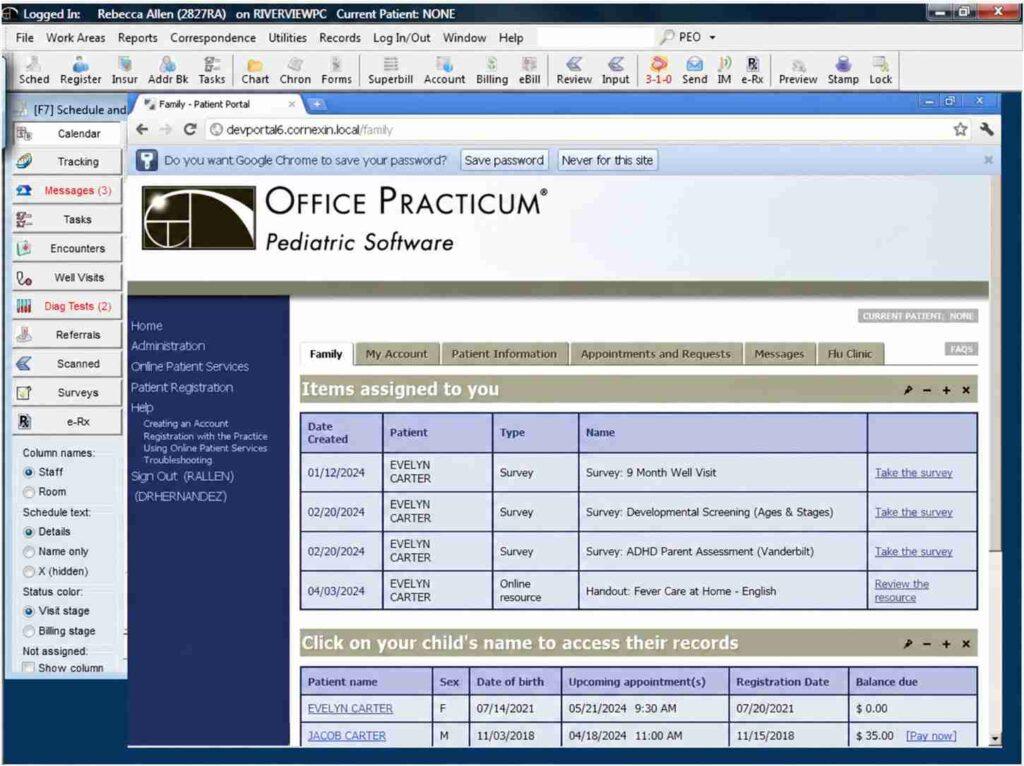
VacLogic supports immunization planning, inventory tracking, recall workflows, and Vaccines for Children (VFC) administration and reporting. Office Practicum also offers pediatric-specific billing and revenue cycle tools.
The specialization is both the selling point and the limitation.
Mixed-specialty groups and family practices that regularly see adult patients will find the system’s design assumptions don’t stretch well beyond pediatric and adolescent care.
But for a practice where 90% of patients are under 18, the depth of pediatric-specific tooling is difficult to match with a general-purpose EMR.
Key features
Office Practicum is designed around pediatric and adolescent care.
- State immunization registry connections
- Pediatric growth charts and milestone tracking
- Pediatric-specific billing and revenue cycle tools
- Well-child visit templates and developmental screening
- VacLogic vaccine inventory, forecasting, and VFC management
Pricing
Office Practicum uses custom pricing. Buyers should confirm which vaccine management, registry connectivity, billing, reporting, and support features are included in their proposed package.
Pros and cons
Pediatricians get depth that general systems can’t match. Everyone else gets a system designed for a population they don’t serve.
| Pros | Cons |
| Built around pediatric workflows, immunizations, and developmental screening | Not designed for non-pediatric specialties |
| VacLogic vaccine management with VFC tracking | Some users report system slowness |
| Pediatric-specific billing tools | Custom pricing requires careful confirmation of included features |
User reviews about Office Practicum
As of October 2026, Office Practicum holds a 4.2/5 overall rating from 277 reviews on Capterra, with a 4.1/5 customer service score.
Pediatricians praise the vaccine management, well-child templates, and immunization registry connections. Some users report slower resolution through newer support channels.
Practices comparing pediatric EMRs should also evaluate PCC, which offers immunization inventory management, VFC features, and pediatric billing workflows as an alternative.
Why your EMR still needs a revenue cycle strategy
Even with integrated billing tools, someone still has to own eligibility, coding accuracy, denial appeals, underpayment recovery, aging claims, and patient collections. Software can flag a missing authorization. Someone has to fix it.
MedHeave runs full-cycle revenue operations inside your existing EHR — no software switch required. According to its published service information:
- Claims submitted within 24-48 hours of signed documentation
- Denial review and corrective action within 72 hours
- Two dedicated account managers per practice (direct line, not a rotating queue)
- 4%-7% of collections, performance-based, no long-term lock-in
- 30-day exit terms
- Company-reported results: 80%+ denial overturn rate, AR below 40 days, 97%+ net collection rate
MedHeave targets practices collecting $100K+ monthly, with a focus on the 1M-3M monthly collections range. These are company-reported figures, not independently audited benchmarks.
Explore MedHeave’s medical billing and coding software resources to compare the technology behind your revenue workflow, or see how our team manages billing inside your existing EMR.
How to choose EMR software for your practice
Pick the system that fits your specialty, size, billing model, and budget — then test the claim lifecycle, not just the charting demo.
Start with specialty fit
Pediatrics, aesthetics, ophthalmology, and gastroenterology have purpose-built systems (Office Practicum, Nextech, ModMed).
A general-purpose EMR with a specialty template bolted on rarely matches the depth of a system designed around that specialty’s exam patterns, documentation needs, and billing codes. If a specialty-specific product exists for your field, evaluate it first.
Match to practice size
Multi-provider and multi-location groups need the scalability and configuration options that platforms like eClinicalWorks or athenaOne offer.
A two-physician primary care practice paying for enterprise-scale infrastructure is buying capacity it won’t use. Elation, Practice Fusion, and CharmHealth serve smaller practices more proportionally.
Compare total cost, not the monthly rate
eClinicalWorks, Practice Fusion, and CharmHealth publish pricing. Quote-based vendors aren’t necessarily more expensive, but they make comparison harder before you commit time to sales calls.
Budget for implementation, training, e-prescribing fees, EPCS enrollment, clearinghouse transactions, interfaces, data migration, and any managed billing services. The subscription rate is rarely the total number.
Test the billing workflow in the demo
The decision most practices get wrong is evaluating charting in isolation.
The demo shows how fast a note gets written. It rarely shows how charges reach the clearinghouse, whether claim scrubbing catches errors, what happens when a claim is denied, or what the data export looks like when you want to leave.
Score finalists against these criteria
Use this checklist before signing with any vendor.
- Verify the product version’s current ONC certification and MIPS reporting capabilities through the Certified Health IT Product List
- Test clinical documentation and charge capture using realistic patient encounters
- Confirm clearinghouse integration, eligibility checks, claim submission, and denial workflows
- Get an itemized quote covering subscriptions, add-ons, training, data migration, interfaces, and support
- Confirm HIPAA safeguards, outside biller access, and any required business associate agreements
- Obtain written details on FHIR-based access, data export formats, access rights, termination charges, and post-termination access terms
- Distinguish features included in the quoted plan from features that carry separate charges
If you’re switching, weigh migration over features
The strongest EMR on paper fails if patient history, attachments, and billing records don’t come with you. Ask the existing vendor about export formats, extraction fees, and timelines before choosing the replacement.
Frequently asked questions
Here are some commonly asked questions about this topic:
An EMR is a digital version of a patient’s chart focused on records within one practice. An EHR is designed to share information across care settings — labs, hospitals, and other providers. Most modern EMR and EHR systems do some of both, and vendors use the terms interchangeably. Judge a product by its actual interoperability capabilities and data exchange standards, not by which acronym the marketing team chose.
Published prices range from free (CharmHealth’s limited plan) to $599/provider/month (eClinicalWorks EHR + PM). Practice Fusion starts at $199/provider/month. athenaOne charges a negotiated percentage of collections. Most specialty systems provide individual quotes. Beyond the subscription, budget for implementation, training, e-prescribing, clearinghouse transactions, interfaces, and data migration — the monthly rate is rarely the total cost.
Practice Fusion and CharmHealth offer published subscription pricing suited to tight budgets. Elation Health fits independent primary care and DPC models. Office Practicum and PCC serve pediatric-focused practices. The right choice depends on specialty, billing arrangements, integration needs, and total cost. Cheaper software that creates billing workflow gaps may cost more in delayed collections than a higher-priced system that keeps claims moving.
A small cloud-based practice with straightforward workflows and limited data migration may go live within a few weeks. Larger implementations with multiple locations, specialty configurations, and extensive migration often take three to six months. Vendors should provide an implementation plan with agreed milestones for data migration, interface testing, staff training, and billing validation. Treat any vendor-claimed timeline as a target, not a guarantee.
Many EHR and practice management systems support authorized external billing staff through individual user accounts. Confirm that the software supports role-based permissions, audit logging, and secure access. When a billing company handles protected health information for a HIPAA-covered practice, a business associate agreement is generally required. MedHeave’s billers work directly inside the practice’s existing EHR — no software switch needed.
Practices participating in MIPS Promoting Interoperability generally need certified electronic health record technology (CEHRT) meeting applicable federal requirements. For 2026, CMS generally requires at least 180 continuous reporting days using CEHRT, though some clinicians and small practices qualify for automatic reweighting or hardship exceptions. Verify the specific product version’s certification through the Certified Health IT Product List before selecting.
Much of a practice’s clinical information can often be exported via C-CDA summaries, but complete transfer is not guaranteed. Historical notes, attachments, images, and billing records may not migrate fully. Ask the existing vendor about all available export formats, extraction fees, and timelines. Confirm what the replacement system can import and how migrated data will be validated. Retaining read-only access to the former system for audits and payer requests is practical, subject to the vendor’s contractual terms.
Some EMRs include scheduling, eligibility verification, charge capture, claims management, and payment posting. Others — like Praxis — focus on clinical documentation and connect to external PM or billing systems. If your EMR doesn’t handle these administrative functions, you need a PM system or a billing partner. Before buying, confirm how the systems exchange charges, claim status, payments, and adjustments — a clean charting experience paired with a disconnected billing workflow creates exactly the revenue gaps this guide covers.